Task Barrier
Motivation & Context
The introduction of Task Barrier support in Velox was driven by two distinct but related high-performance workloads: AI training data loading and Real-time Streaming Processing. Both require strict control over task lifecycle and state management.
These workloads share three critical requirements:
High Efficiency (Task Reuse): AI training feeds data split-by-split. Creating a new VeloxTask for every single split incurs some overhead (memory allocation, plan optimization, operator initialization).
Checkpointing & Consistency (Streaming): Streaming systems need a way to safely “pause” the stream to take a consistent snapshot. To do this, the system must ensure all data belonging to a specific time window or epoch is fully processed and flushed before moving to the next.
Deterministic Execution: To ensure experiments are reproducible, data order and processing must be identical across runs.
The Solution: Task Barrier
To solve this, Velox uses Sequential Task Execution combined with a Task Barrier. This allows a single Velox Task to be reused indefinitely.
The “Barrier” is a synchronization mechanism that forces the task to “pause” and drain all in-flight data—including buffered data in stateful operators.
For AI Loading: This ensures the task is clean and ready for the next batch of splits without overhead.
For Streaming: This acts as a “consistent cut,” ensuring that all state modifications for the current epoch are finalized and emitted before the next epoch begins.
API & Usage
The core API introduced is Task::requestBarrier(). This signals the task to
finish processing all currently queued splits and fully drain all stateful
operators.
Workflow
Feed Splits: The application adds a set of splits to the task, providing exactly one split per each data source (e.g., one file split for every TableScan node).
Request Barrier: Immediately after feeding the splits, the application calls
requestBarrier(). This signals that no more splits will be added after this Split Set until it has been fully processed, all resulting data has been produced, and the task has completely drained and signaled its completion (reached the barrier).Process & Barrier Detection: The application continuously calls
task->next()to fetch results. From a user perspective, the Barrier Reached state is detected precisely when:task->next()returns no data (nullptr), ANDThe returned ContinueFuture is not set (invalid)
This specific combination confirms that the task is not merely blocked waiting for I/O, but has fully drained all vectors from the current Split Set and is now idle.
(Note: The internal mechanism of how drivers coordinate this draining sequence and signal completion to the Task is explained in detail in the Implementation Mechanism section).
Decision (Cycle or Finish): Once the barrier is reached, the application must take one of two actions:
Finish Task: If there are no more splits to process (e.g., end of dataset), call
noMoreSplits()on the task to signal the final end of the job and terminate.Repeat Cycle: If more splits exist, proceed to Step 5 to add the next set.
Resume: The application adds the new Split Set and repeats the process from Step 1.
Code Example (C++)
The following pseudo-code illustrates how an AI data loader interacts with the Velox Task Barrier:
// AI data loading loop
// 1. Get splits from the runtime
// 2. Feed them to Velox
// 3. Wait for barrier to ensure all data for those splits is produced

bool addSplits();

for (;;) {
  // Data consumption loop
  while (true) {
    ContinueFuture dataFuture = ContinueFuture::makeEmpty();
    // Fetch next batch of results (velox vector)
    auto data = veloxTask->next(&dataFuture);

    if (data != nullptr) {
      // Consume the data (e.g., feed to training loop)
      consume(data);
      continue;
    }

    // If no data is returned, check if we are blocked
    // BARRIER REACHED CONDITION: Data is null AND future is invalid.
    if (!dataFuture.valid()) {
      // The Task is now idle at the Barrier.

      // Attempt to fetch new splits for the next Split Set
      if (getSplits()) {
        continue; // New splits added -> Resume processing (Repeat Cycle)
      }

      // No more splits available -> Execution finished.
      return;
    }

    // Wait for the task to produce more data
    wait(dataFuture);
  }
}

// Helper to add splits and request barrier
bool getSplits() {
  auto splitSet = nextSplitSet();

  // TERMINATION CONDITION:
  // If no more splits are available from the source (e.g., end of dataset),
  // we must explicitly signal the Task that input is finished.
  if (!splitSet.has_value()) {
     for (auto& [op, planNode] : veloxPlan.leafNodes) {
       veloxTask->noMoreSplits(planNode->id());
     }
     return false;
  }

  // Add splits for all leaf nodes
  for (auto& [op, planNode] : veloxPlan.leafNodes) {
    veloxTask->addSplit(planNode->id(), splitSet.at(planNode->id()));
  }

  // Request a barrier immediately after adding the split set
  // This acts as a seal for the current split set, ensuring the task
  // drains fully.
  veloxTask->requestBarrier();
  return true;
}
Implementation Mechanism
The implementation relies on a special Barrier Split and a cooperative draining mechanism within the Driver pipeline.
The Barrier Split
When requestBarrier() is called:
Velox injects a special “Barrier Split” into the split queue of every source operator in the leaf drivers (the drivers that read raw input splits).
This split acts as a Sentinel that flows through the pipeline.
It is excluded from standard task split processing statistics.
Draining Stateful Operators
Standard stateless operators (e.g., Filter, Project) process data vector-by-vector, typically producing one output vector for each input vector without buffering. They handle the barrier sentinel simply by passing it downstream once the current input vector is finished.
However, stateful operators (like Aggregations or Joins) actively buffer data across multiple input vectors. The barrier mechanism forces them to flush this buffer via a BarrierState maintained by each Driver.
The Draining Process:
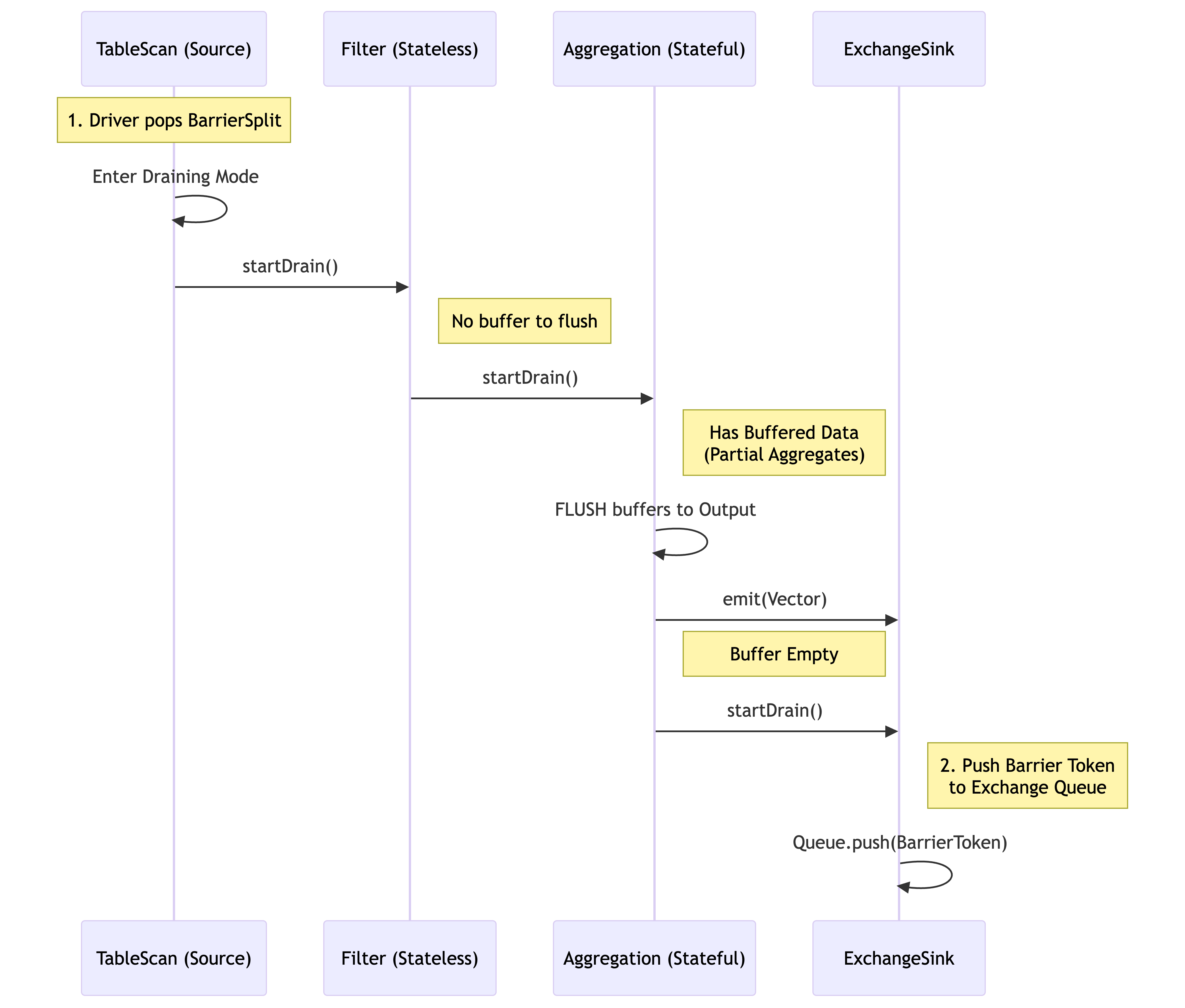
Trigger: When a source operator receives the Barrier Split, it enters “draining mode” by calling the driver’s
drainOutput()method.Action: The driver then propagates this state by calling
startDrain()on the next operator in the pipeline.Flush: If that operator is stateful, it flushes all buffered data to the output.
Forward: The operator then calls
startDrain()on its downstream operator, ensuring the signal flows operator-by-operator within the driver.
Diagram: Draining Flow (Single Driver)
The diagram below shows how the signal flows. Notice how the Stateful Operator must flush its buffer before passing the signal to the Sink.
Cross-Pipeline Propagation (The DAG)
A complex query plan in Velox is executed as a Directed Acyclic Graph (DAG) of pipelines. The barrier must propagate through this entire graph in topological order.
Mechanism: LocalExchange via Exchange Queue
The pipelines in Velox are connected by LocalExchange through an Exchange Queue mechanism. This structure allows the barrier signal to “jump” across pipeline boundaries.
Leaf Pipeline Completion: The barrier processing starts at the leaf drivers. The signal propagates down the operators until it reaches the Sink Operator (e.g., LocalPartition, LocalExchangeSink).
The Bridge (Queue): When the Sink Operator receives the
startDrain()signal, it first flushes any buffered data it holds. It then places a special Barrier Token into the connecting Exchange Queue. This marker sits immediately after the last data vector generated by the current Split Set.Downstream Pipeline Activation: The downstream driver (e.g., the Join pipeline) reads from this queue. When its Source Operator encounters the Barrier Token, it interprets this as the signal to initiate the barrier sequence for its own pipeline.
Synchronization: This ensures strict ordering. Pipeline B cannot finish its barrier processing until Pipeline A has fully flushed its data and passed the barrier token. The Task monitors the completion of all drivers via the internal
finishDriverBarrier()mechanism; only when the final sink in the final pipeline has finished draining is the Barrier Future fulfilled.
Illustration: MergeJoin Example
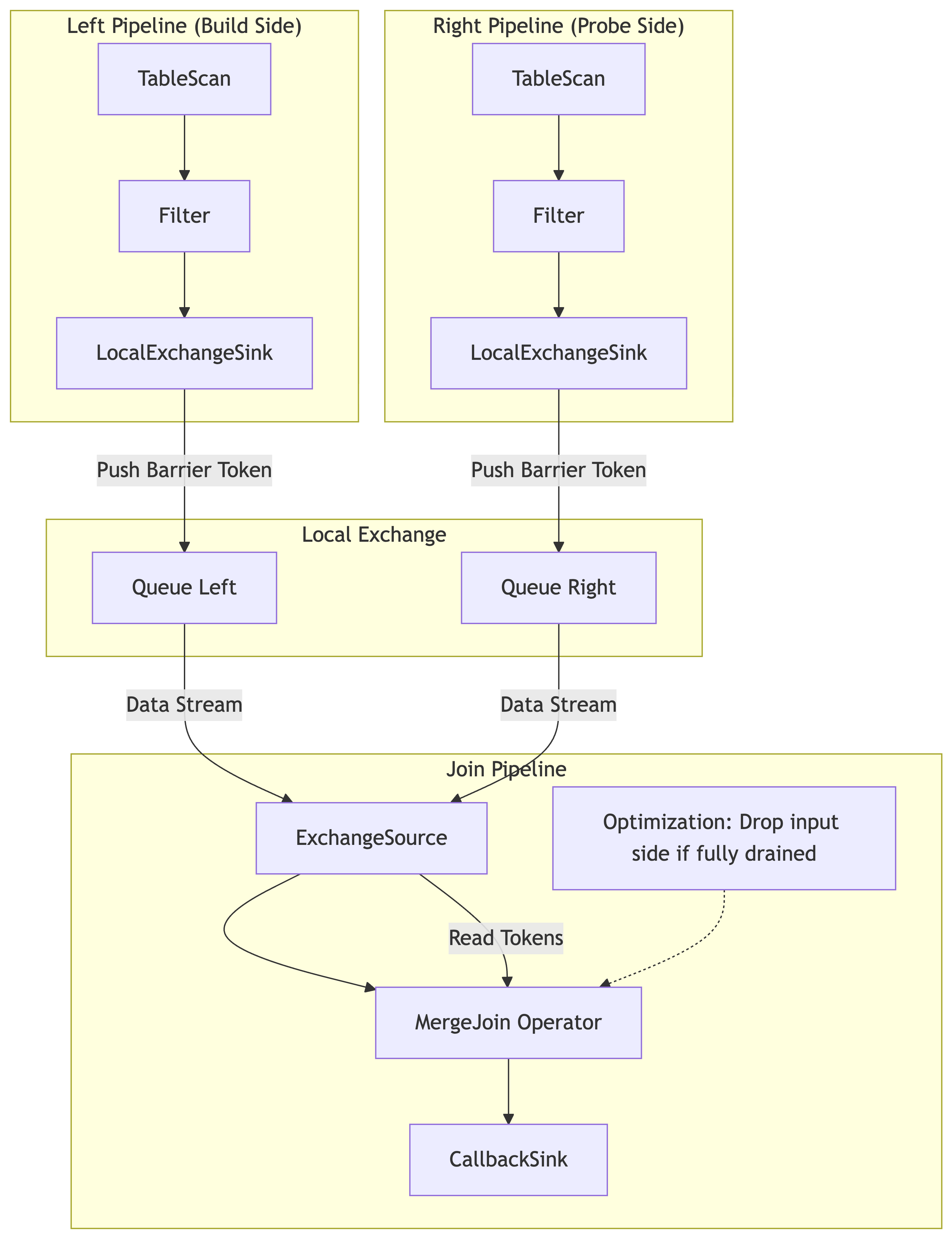
Consider a MergeJoin with two upstream pipelines (Left and Right) feeding into a Join pipeline.
Step 1: The Task injects Barrier Splits into the TableScan operators of both the Left and Right pipelines.
Step 2: Both pipelines process their splits, flush their local operators (e.g., filters), and push data to their respective Exchange Queues.
Step 3: Both pipelines finish by pushing a Barrier Token into their queues.
Step 4: The Join Pipeline reads from these queues. It processes data until it hits the Barrier Token on both inputs.
Step 5: The MergeJoin operator receives
startDrain(). It performs the “Drop-Input” optimization (checking if it can stop early) and flushes any remaining matches.Step 6: The Join pipeline completes, fulfilling the user’s promise.
TableScan & Source Operator Mechanics
The TableScan (or any Source Operator) is the entry point for the barrier signal. Its behavior is critical for determining when to “Pause” (Drain) and when to “Resume.”
Delivery (Entering the Barrier)
Injection: The
requestBarrierAPI directly injects a BarrierSplit into the Task’s split queue. This split is distinct from regular data splits (e.g., FileConnectorSplit).Detection: The Driver loop responsible for the TableScan fetches the next split from the queue. When it pops the BarrierSplit, it does not attempt to read data.
Signal Initiation: Instead of calling getOutput, the driver invokes
startDrain()on the TableScan operator. This initiates the cascading drain sequence described in The Draining Process Section.Exclusion: The TableScan ensures this split does not increment task progress counters (e.g., “completed splits”), ensuring the barrier is transparent to execution metrics.
Resuming (Exit & Next Split)
Idle State: Once the TableScan has propagated the drain signal and the downstream pipeline has fully drained, the Driver completes that specific execution cycle. The Task marks the barrier future as complete.
Wait: The TableScan driver does not terminate; it simply returns to checking the split queue. If the queue is empty, the driver yields (waits).
Re-activation: When the application calls
addSplit()with new data splits for the next logical Split Set:The splits are pushed to the queue.
The TableScan driver wakes up, pops a valid data split, and resumes standard data processing (getOutput).
This seamless transition allows the same Task and Driver instances—and their associated memory pools and caches—to be reused indefinitely.
Operator-Specific Implementation Details
The core of the barrier implementation lies in the startDrain() virtual
method. While stateless operators simply pass the signal through, stateful
operators must actively manage their buffers to ensure data determinism.
Index Lookup Join
Function: Connects a stream of input rows (probe side) with a remote or local index (build side), often fetching matches asynchronously.
Draining Complexity: The operator typically buffers input rows to perform batched lookups or asynchronous prefetches. Simply stopping input isn’t enough; pending lookups inside the execution engine must complete and be emitted.
Barrier Logic:
Flush Prefetch Buffers: When the barrier signal is received, the operator forces the flushing of any “in-flight” batches that have been sent for lookup but haven’t yet produced output.
Drain Output: It ensures that
getOutput()continues to return results until all buffered lookup requests have been resolved and emitted.
Unnest
Function: Expands complex types (arrays, maps) into multiple rows.
Draining Complexity: An Unnest operator might require multiple calls to
getOutput() to fully process a single large input vector due to output batch
size limits. If a barrier arrives, the operator cannot simply stop; it must
finish expanding the current vector.
Barrier Logic:
Process Remaining Rows: The
startDrain()logic ensures that the operator does not accept new input vectors but continues to generate output until the current input vector is fully unnested.Clean State: Once the current input vector is exhausted, the operator transitions to a finished state for that specific barrier cycle, ensuring no partial arrays are left “half-expanded” across the split boundary.
Sort Merge Join
Function: Assumes both inputs are sorted and finds matches by traversing them simultaneously. It is highly stateful and relies on the relative order of keys.
Draining Complexity: “Over-Reading” in Draining Mode
In a standard Sort Merge Join, the operator buffers rows from one side while iterating through the other. When a Barrier acts as a temporary “End of Stream,” the operator might continue reading from one input even after the other input has finished, to find potential matches. However, because the inputs are sorted, the operator often knows that no further matches are possible, making this extra I/O wasteful.
Barrier Logic & The “Drop-Input” Optimization
This operator implements an optimization to prevent wasteful processing:
Draining Matches: When
startDrain()is invoked, the operator forces the processing of any matches currently possible with the buffered data.Early Cutoff (Drop-Input):
Logic: If one side of the join is fully processed/drained (hit the barrier), the operator compares the max key from that finished side against the current key of the active side.
Decision: If the active side’s key has already passed the finished side’s max key (based on sort order), no future matches are possible.
Action: The operator sets the
dropInputOpIdin the BarrierState. This signals the driver to stop pulling data for the remaining side immediately.
This optimization saves significant CPU and I/O resources while still guaranteeing the same correct result as a full drain.
Streaming Aggregation
Function: Computes aggregates (SUM, COUNT, etc.) on data already sorted by grouping keys.
Draining Complexity: The operator buffers the current group’s accumulation in memory. If the split ends exactly at a barrier, that partial accumulation exists in the operator’s state but hasn’t been emitted because the operator hasn’t seen a “new” key to trigger the flush.
Barrier Logic:
Force Group Flush: Upon receiving the barrier signal via
startDrain(), the operator treats the event as a virtual “end of stream” for the current batch. It forces the emission of the accumulated result for the current group key, even if the key hasn’t changed yet.Reset Accumulators: After flushing, the accumulators are reset. This ensures that when the task resumes after the barrier with new splits, it starts fresh.
Hash Aggregation
Function: Computes grouped or global aggregates using an in-memory hash table instead of relying on sorted input.
Limitation: Hash aggregation barrier support is currently intended for
in-memory aggregation only. It’s recommended to keep spill disabled when
using task barrier with hash aggregation. Otherwise, if the task has
spilled, requestBarrier() is not supported and will cause the subsequent
next() call to throw.
Limitations
Sequential Execution Mode Only: The barrier logic currently requires the task to be running in sequential execution mode (single-threaded logic per driver).
Restricted Data Sources: The barrier execution strictly supports only TableScan source nodes. Other source nodes, such as Values (value source node) or RemoteExchange (remote exchange node), are not supported.
HashJoin: Not supported. HashJoin involves complex build-side state management that is less common in the streaming/AI workloads targeted by this feature. These workloads typically rely on MergeJoin or IndexJoin to maintain order and lower memory footprint.